US English (US)
AU English (AUS)

Contact Us

If you still have questions or prefer to get help directly from an agent, please submit a request.
We’ll get back to you as soon as possible.

Please fill out the contact form below and we will reply as soon as possible.

  • Contact Us
English (AUS)
US English (US)
AU English (AUS)
  • Home
  • Product Support
  • Wissner-Bossnerhoff

How to Reset a WiBo Handset

Learn how to successfully reset a WiBo Handset and overcome any technical difficulties.

Written by Joel B

Updated at March 16th, 2026

Contact Us

If you still have questions or prefer to get help directly from an agent, please submit a request.
We’ll get back to you as soon as possible.

Please fill out the contact form below and we will reply as soon as possible.

Download
  • FAQs
  • Support
  • Product Support
    CleanPatch Shower Commodes Gantry Hoists Patient Trolley / Stretcher / Transport Chair Pressure Care Linet Wissner-Bossnerhoff Hoists
+ More

WiBo Handset Reset

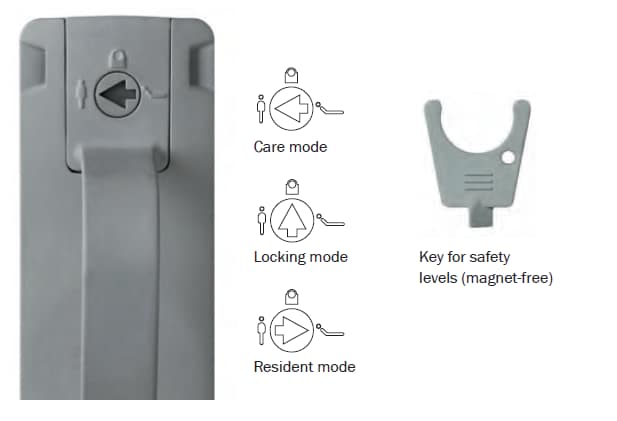
1. Make sure blue arrow on back of handset is facing towards the person standing up.

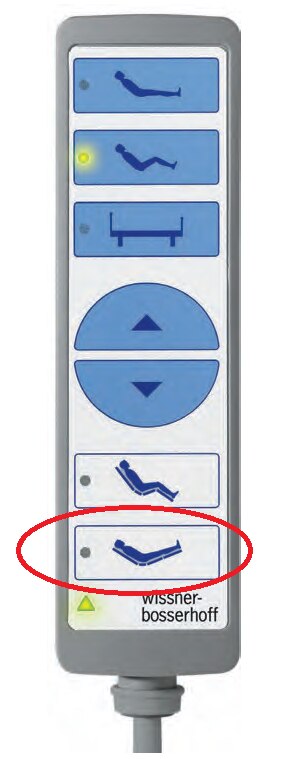
2.Activate the last button, then press the up/down arrows together.

Additionally, keep both buttons pressed down until the bed raises all the way up and back down and you should hear three (3) beeps. 

Please note: Remove/move all items out of the way to ensure bed space is clear, be careful when the bed raises all the way up and down.  

The bed should raise all the way up and back down, and you should here 3 beeps which indicates it's been reset.


restore reboot

Was this article helpful?

Yes
No
Give feedback about this article

Related Articles

  • Wissner-Bosserhoff Handset Instructions
  • How Does A Transport Chair Improve Efficiency?
  • Calibrating Controller - SafeLift® – Quick Guide
  • Adjustment Functions - SafeLift® – Quick Guide
  • Additional Functions - SafeLift® – Quick Guide

Copyright © 2026 Website Privacy policy

Expand